Challenges Revisited
Challenges Revisited
Those of you who have been following my blog for a while now (hi mom!), might remember when I wrote about my Sinatra project. Now that was a while ago so I’ll refresh your memory a little.
Basically, I was fishing around for ideas for a bootcamp project for Flatiron School’s Full Stack Web Development course, specifically, I needed to make an app using the Sinatra framework. At the time I was talking to a friend who suggested I try a Reddit clone, hastily adding “never mind, it’s probably too hard for you…” the result was Freddit, a very basic Reddit clone that allows users to have conversations with each other by posting topics and replying to them.
At the time, there was one feature I didn’t implement, and that was nested comments. Users were able to reply to a conversation, but their replies just got tacked to the bottom of the conversation with no ability to respond to specific comments.
Fast forward a few months, I know finished the Rails part of Flatiron’s curriculum, as well as the JavaScript/JQuery sections. It was time for my next project, and with my larger skill-set, I felt confident enough to give Freddit a much-needed makeover, this time with nested comments.

The challenge for this project was to build a web app using Rails as the back-end with JQery on the front-end, using a Rails API to pass info from the server to the browser and back. This fit very well with my vision for Freddit. Ideally, I would have liked for users to be able to reply to conversations from the actual conversation page. They should be able to click on a “Reply” button that would have a form pop up, type in their reply, hit submit, and have their reply added to the conversation, all without leaving the page. That’s the kind of flow JQuery is good at, using AJAX to communicate with the back-end Rails server.
My first step was to take the original Freddit, which was built using Sinatra, and give it a complete Rails makeover.
Next step was to figure out how to get my comments to nest, I had a general idea of how to do it, I needed to have an association in my Comment model where a comment would has_many comments (or replies), while at the same time each Comment would also belong_to either a comment or directly to the conversation it was in (for more on associations see my blog post: rails generate association).
So I did some reading, found some great blog posts on the topic. I was especially helped by this tutorial, and that’s the approach I ended up taking.
To render the nested comments in the views, I used a neat little trick where I had _comment partial, and within the partial, I called the comment partial to display the replies.
Below you can see a simplified view of my comment partial, you’ll notice down at the bottom where it says render partial: ‘comments/comment’, I’m calling the partial from within the partial! (so meta)
<div class="body" id="body-<%= comment.id %>">
  <%= simple_format(comment.body) %><br>
</div>

<small>Submitted <%= time_ago_in_words(comment.created_at) %> ago by <%= link_to comment.user.username, comment.user %></small><br>

<div class="reply-form" id="comment-<%= comment.id %>">
  <%= link_to "Reply", new_comment_comment_path(comment) %>
</div>

<div class="reply" id="reply-to-<%= comment.id %>">
  <%= render(partial: 'comments/comment', collection: comment.comments) %>
</div>
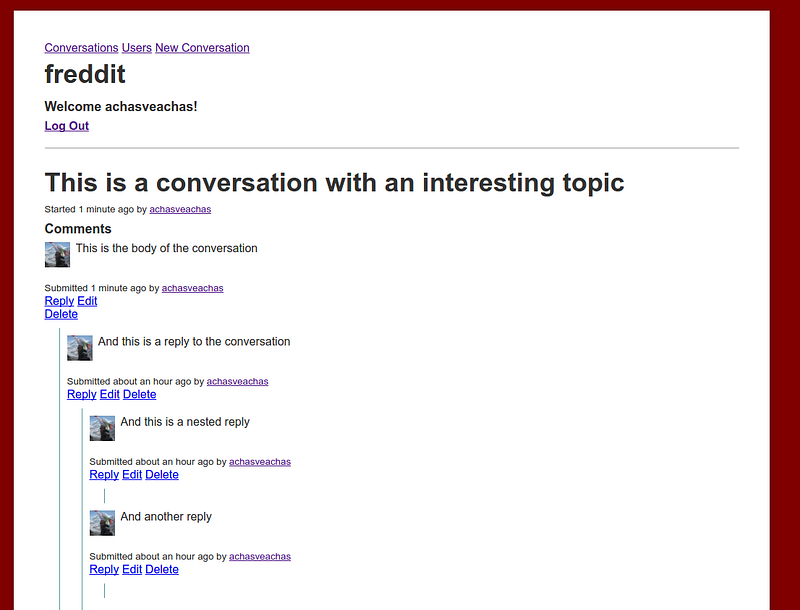
An example of a Conversation in freddit, showing nested comments.
So at this point, my app was looking the way I wanted, but it wasn’t acting the way I wanted. You see, those “Edit” and “Reply” links there were just that, links that took you to a page with a form where you could edit a post or reply to one. That’s pretty cumbersome from a user perspective, I wanted those links to render the form right there in the page, without the need to redirect to a new page.
Enter Asynchronous JavaScript and XML (AJAX to his friends), that cool little library that lets you run queries to your server and render the reply, all from your browser, without having to leave the comfort of your web page.
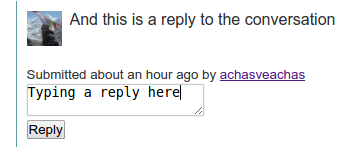
AJAX let me render the reply form in the page (see image on the left), and then when I hit “Reply” that reply went to my Rails server in the background, was added to my database, and sent back as JSON to be rendered seamlessly into the page with no need for a refresh.

At this point, my project was mostly ready for submission. It’s as ugly as they get, but I did learn a lot about JavaScript, JQuery, and AJAX. JavaScript and I are still in a love/hate relationship, but at least I’m learning to understand her better and appreciate some of her strengths.
The project took longer than I hoped, but that turned out for the best, as in the meantime Flatiron rolled out their React curriculum, and I’m so looking forward to getting into that.
So with that I’ll sign off for now.
Happy Coding!
P. S. If you want to play around with Freddit you can find it here. The source code can be found on GitHub. It’s an Open Sourced project, contributions are welcome.
If you liked this post, I’d appreciate if you recommended it to your friends. You can see some of my other posts on my blog. You can also follow me on twitter @yechielk or on my website yechiel.me
Comments